Read the job description twice
It tells you what they're measured on. Turn the responsibilities into your "how I can help" bullets — in their words, mapped to your experience.
Almost everyone sends the same PDF. Almost nobody builds a page for the specific role. A targeted “[Your Name] for [Company]” application website argues — clearly — why you're the best candidate for this one job. Here's how to build one.
When 500 people apply the same way, doing a little more is the whole edge.
A hiring manager is trying to answer a few questions fast: Are you qualified? Do you understand the role? Do you actually care about this company? Is there proof?
A PDF answers some of that. A page built for their role answers it faster — and it stands out precisely because so few people bother to make one.
This isn't a flashy personal brand. It's doing a bit more than most applicants, in a way that's genuinely useful to the person reviewing you.
john-smith-resume.pdf
You sendJohn Smith for Acme Ltd.
Product designer applying for the Growth Design role — and exactly why he fits it.
Think of it as a clean application packet — focused on one role, in this order.
Say exactly what the page is — your name, the role you're applying for, and one line on the value you bring. No vague "passionate problem-solver" headline.
Three short beats: why you're applying (this company, this role), why you fit, and how you'd start in the first 30 days. Readable, not homework.
Three to five specific bullets pulled from the job description and their product — concrete ways you'd contribute, not a list of your skills.
Only the two or three roles that matter for this job, each with a measurable win. Save the full history for the resume.
The projects, metrics, or work samples that match the role. Choose proof for this job, not everything you've ever done.
Skills, education, and a "Download resume" button for the people who still want the file or have to feed an ATS.
Email and LinkedIn as plain links. Keep your home address, references, and salary history off a public page.
The difference between a targeted page and a generic one is research — about an hour of it.
It tells you what they're measured on. Turn the responsibilities into your "how I can help" bullets — in their words, mapped to your experience.
Their homepage, product pages, pricing, and customer stories tell you what the company actually does and who it serves. Reference something real.
Applying for a customer-success role? Lead with onboarding and retention, not every project you've shipped. Match the evidence to the role.
Use what you can see from the outside. Don't pretend to know their internal problems — confident and grounded beats know-it-all.
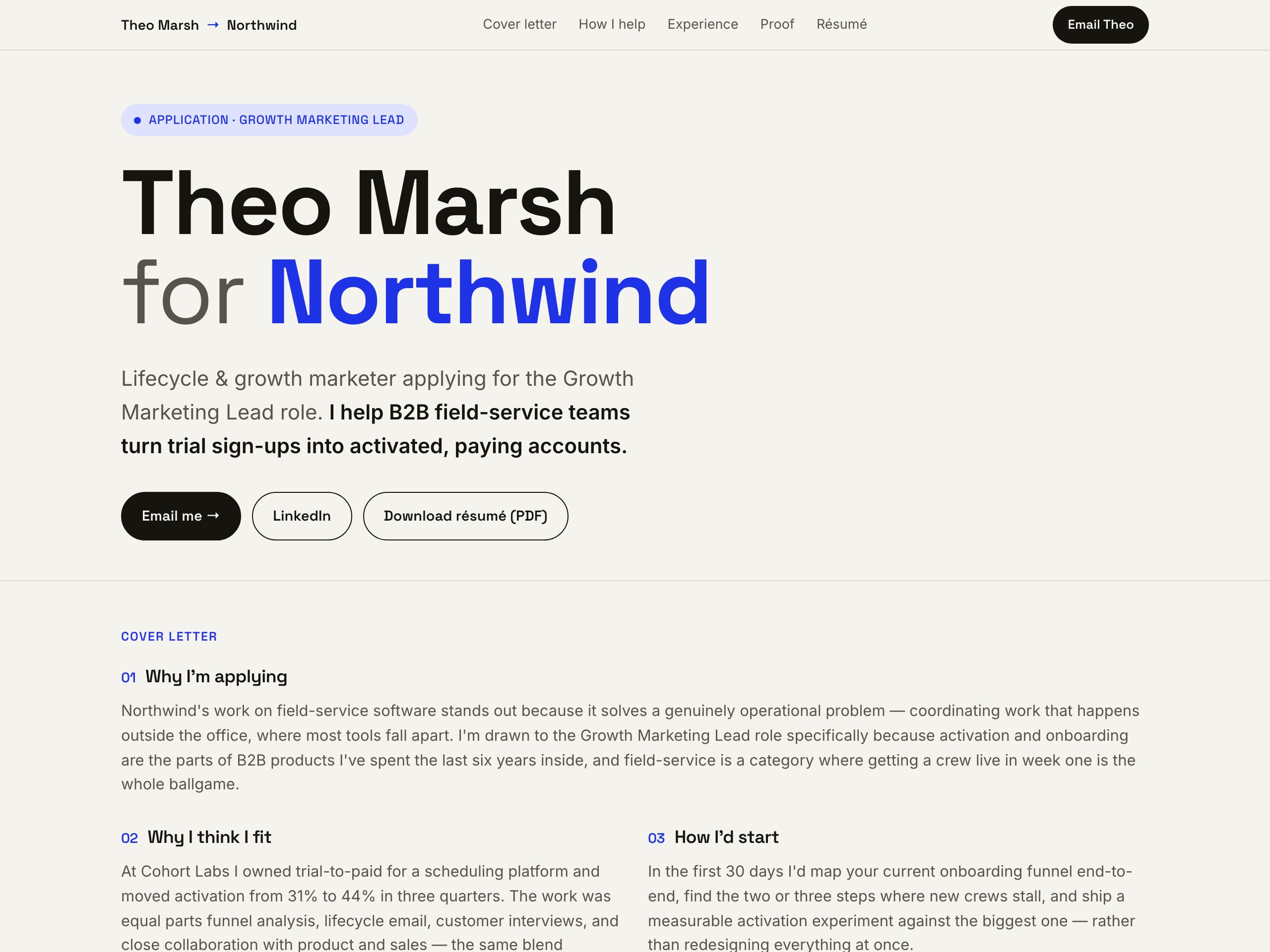
A growth marketer's application for one specific role — hero, a three-part cover letter, a "how I can help Northwind" list, matched proof, and a downloadable resume. This is the whole pattern, built.
Standing out doesn't mean being gimmicky. Show you did your homework — and leave these off.
A general resume website is the reusable link you put on LinkedIn, in your signature, and in every application. Build it once.
For the roles you really want, spin up a targeted page from the same material and make the case for that one job. The two-asset playbook covers when to use each.
No — send it alongside your normal application, not instead of it. Put the link in your resume header, your cover letter, the "website" field on the form, or a follow-up email. Something like: "I also made a short page for this application that explains why I'm interested and how my background fits — [link]."
Start from your general resume website or your PDF — the base is already done. The targeted parts (cover letter, "how I can help", matched proof) are about twenty minutes. Reserve it for the handful of roles you genuinely want, not every application.
Yes. Turn on password protection from the workspace, or keep the URL unlisted and share it only with that employer. For a broader public presence, use a general resume website or a resume link instead.
Use both assets together: one general resume website as your everyday link, and a targeted page only for the roles worth the extra twenty minutes. The general site does the volume; the targeted page wins the ones you care about.
Nanopage builds the page for free in a few minutes; publishing it live is $19 / year — hosting, HTTPS, and a real URL included. One subscription covers your general site and any targeted pages.
Build a page for the job you actually want — free in a few minutes, $19 / year to publish. Send it with your application.