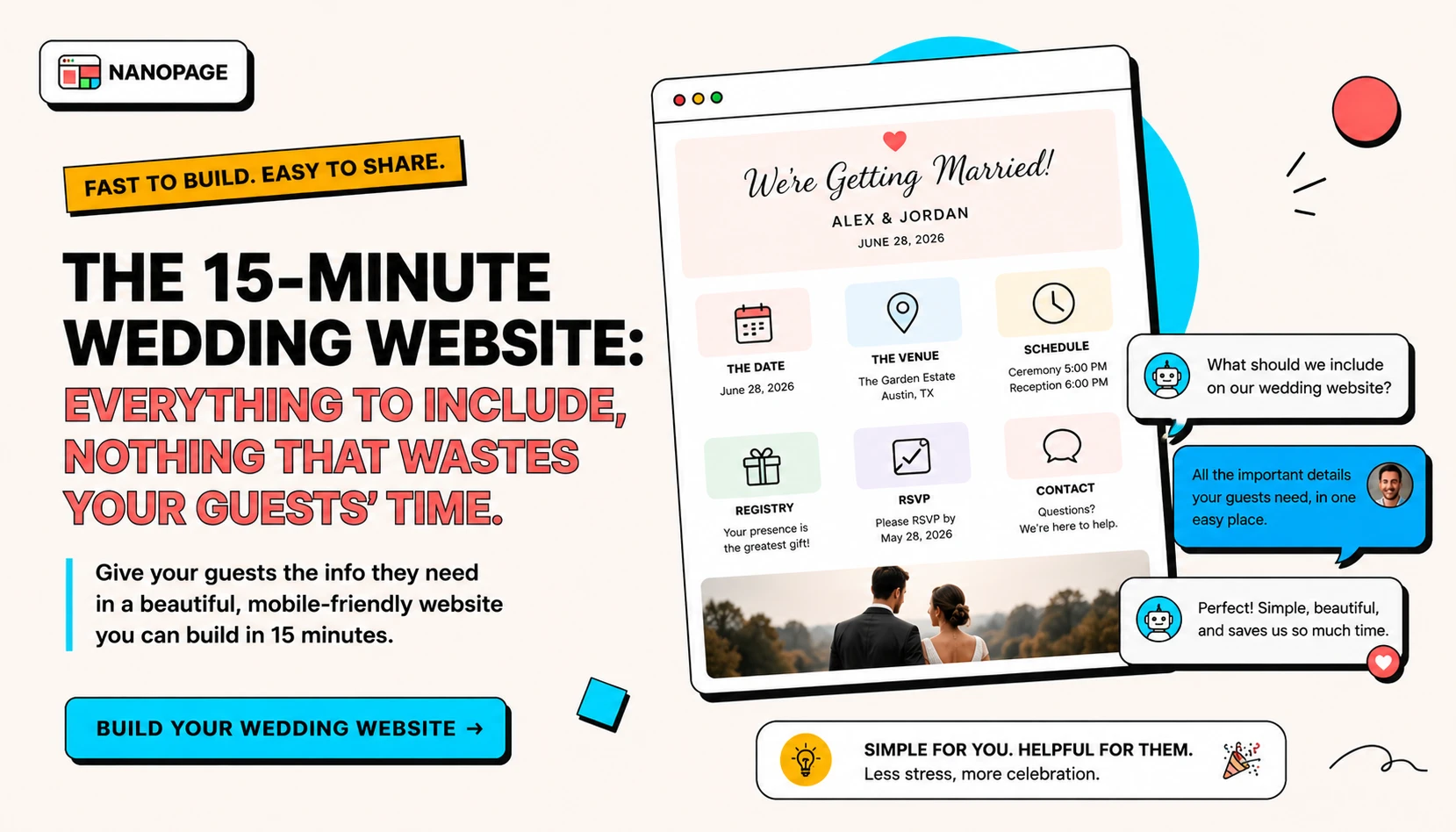
A wedding website has one job. Help your guests show up to the right place, at the right time, dressed the right way, with the information they actually need.
That is it.
Most wedding sites try to do much more. Countdown timers. Multi-page love stories. Slow photo carousels that buffer on the venue's parking lot Wi-Fi. Background music. None of it helps your guests, and most of it slows the page down on the phones they will actually use.
This guide is the short version. Everything to include, nothing that wastes your guests' time, and a 15-minute path to a live URL.
What guests actually open your wedding site for
Before any design decision, remember why guests land on the page.
In rough order, they want:
- The date and the start time
- The address of the ceremony and the reception
- Whether they are invited to the ceremony, the reception, or both
- The dress code
- The RSVP link or instructions
- Where to stay if they are traveling
- Whether kids and plus-ones are welcome
- The registry link
- A schedule for multi-day weddings
- A contact in case of trouble on the day
If your wedding website answers those ten questions clearly, you are already ahead of most wedding sites on the internet.
The 15-minute wedding website checklist
Use the sections below in roughly this order. You do not need every section. Skip what does not apply.
1. Names and a date
The first thing on the page should answer two questions in one line.
Weak:
Welcome to our journeyBetter:
Maya and Daniel - June 14, 2026 - Hudson Valley, NYNames. Date. Region. Done.
This is also your page title and your meta description if you care about search and link previews.
2. One clear "what is this" sentence
Below the names and date, add a single short sentence.
Examples:
A small outdoor ceremony followed by dinner and dancing at Locust Grove Farm.A two-day celebration with a welcome dinner on Friday and the ceremony on Saturday.An intimate courthouse ceremony with a casual reception that evening.Guests should know within five seconds whether this is a backyard barbecue or a black-tie affair.
3. Schedule
For a one-day wedding, the schedule is short. List the major moments with times and locations.
Example:
3:30pm - Guest arrival
4:00pm - Ceremony at Locust Grove Farm
5:00pm - Cocktail hour
6:30pm - Dinner
8:00pm - Dancing
11:00pm - Last call
For a multi-day wedding, group events by day:
Friday, June 13
6:00pm - Welcome dinner at Brookfield Inn

Saturday, June 14
3:30pm - Ceremony at Locust Grove Farm
6:30pm - Reception
11:00pm - After-party

Sunday, June 15
10:00am - Farewell brunch at the inn
Use real times. "Evening" is not a time. Guests who are flying or driving need a number.
4. Venue and address
Make the venue address obvious and tappable.
Include:
- Venue name
- Full street address
- A map link
- Parking notes
- Accessibility notes
- Closest airport or train station for travelers
Example:
Locust Grove Farm
182 River Road, Rhinebeck, NY 12572
Map: maps.app.goo.gl/locustgrove
Parking: Free on-site, grass lot. Lot opens at 3:00pm.
Accessibility: Gravel paths between ceremony and reception. Golf cart available on request.
If the ceremony and reception are at different venues, list both. Say how guests are expected to travel between them, and whether you are providing transportation.
Do not put the address only inside an image. Write it as text so guests can tap, copy, and search.
5. Dress code
Guests genuinely worry about this.
Use plain language plus one specific example.
Good:
Cocktail attire. Think suits and dresses you would wear to a nice restaurant. The ceremony is on grass - heels will sink.Good:
Black tie optional. Tuxedos and floor-length dresses welcome, but a dark suit and cocktail dress are fine.Good:
Garden party casual. Linen, light colors, comfortable shoes. We will be outdoors all afternoon.If there are color requests, say so plainly. If there are no rules, say that too:
Wear what makes you feel great. No dress code.6. RSVP
The RSVP section is the most important link on your site.
Decide one method and stick with it:
- A form embedded or linked from the page
- An email address
- A phone number with text instructions
- A reply card returned by mail
- A booking tool like RSVPify, The Knot RSVP, Zola RSVP, or a Google Form
Whatever you pick, link directly to it. Repeat the RSVP link at least twice on the page - once near the top and once near the bottom.
Include:
- The deadline date (in real words, not just a calendar widget)
- Whether plus-ones are invited
- Whether kids are invited
- A meal choice question if you have one
- A dietary restrictions field
- A song request field if you want one
Example:
RSVP by May 1, 2026.

Please respond at maya-and-daniel-rsvp.com
or text Maya at (555) 123-4567.

Names on the invitation envelope are the invited guests.
We love your kids and are keeping the celebration adults-only.
7. Travel and accommodations
For destination weddings, weekend weddings, or any wedding with out-of-town guests, include a travel block.
What to include:
- Closest airport with travel time to the venue
- Closest train station if relevant
- Hotel block details with code and deadline
- Two or three alternate hotels at different price points
- An Airbnb or vacation rental note
- Rideshare availability at the venue
- Shuttle details if you are providing one
Example:
Closest airport: Albany International (ALB), 90 minutes by car.
Alternate: New York JFK or LGA, then Amtrak to Rhinebeck, 2.5 hours.

Hotel block: Beekman Arms in Rhinebeck.
Code MAYDAN2026, $189 per night, book by April 15.

Alternates: Mirbeau Inn (luxury) or Hampton Inn Kingston (budget).

Shuttle: Bus from Beekman Arms to the venue at 3:00pm, returning at 11:30pm.
If a third of your guests are flying in, a clear travel block is the single most useful thing on your site.
8. Registry
Most guests will look for the registry link. Make it easy to find.
If you have multiple registries, list them.
Example:
Registry:
Crate and Barrel - crateandbarrel.com/gift-registry/maya-daniel
Honeyfund (honeymoon) - honeyfund.com/site/maya-daniel-2026
Zola - zola.com/registry/mayaanddaniel
If you would rather not have a registry, say so simply:
Your presence is the present. If you would like to give something, we are saving for a kitchen renovation - any contribution is appreciated and never expected.Skip the long apologetic paragraph. One line is enough.
9. Kids and plus-ones
Be direct. Guests will check the site to figure this out without asking you.
Examples:
The names on your invitation envelope are the invited guests.Kids are welcome. We will have a kids' table with crafts and a babysitter from 7pm onward.This is an adults-only celebration. We hope this gives parents a fun night off.Plus-ones are listed by name on your invitation. If yours says "and guest," please send their name with your RSVP.The point is to remove ambiguity before the awkward text message.
10. FAQ
A short FAQ section catches the questions guests ask the most.
Useful questions:
- Can I bring a plus-one?
- Are kids welcome?
- What is the dress code?
- Is the ceremony outdoors?
- What happens if it rains?
- Is there parking at the venue?
- Is the venue accessible?
- Are dietary restrictions accommodated?
- Will there be an open bar?
- What time should I arrive?
- Where should I stay?
- Is there a shuttle?
- Can I take photos during the ceremony?
- Is the wedding kid-friendly during the reception?
- How do I RSVP?
Pick the five to eight that actually apply. A short, specific FAQ beats a long generic one.
11. Photo and video guidance
Tell guests how you want the day captured.
Examples:
Unplugged ceremony: please keep phones away during the ceremony. We have a photographer.Snap and share: tag #mayadaniel2026 so we can find your photos.Group photos: 7:30pm on the lawn, near the big oak.This is also where you note any "no social media until we share ours" requests.
12. Contact for the day
One person other than the couple should be reachable on the day.
This is usually a wedding party member, a planner, or a parent.
Day-of contact: Priya Shah, maid of honor, (555) 987-6543.
Please text Priya if you are lost, running late, or have a venue question.
Guests will use this. The couple should be unbothered.
What to skip
The following take time to build, slow the page down, and rarely help anyone.
Skip:
- Long "our story" essays with timeline scrolls
- Countdown timers
- Background music or autoplay video
- Hero carousels with five rotating photos
- Animated entrances on every section
- Photo galleries before the wedding has happened
- Wedding party biographies for every member
- Generic "we cannot wait to celebrate with you" filler paragraphs
- Custom illustrations of the couple as cartoons unless you genuinely love them
- A separate "Things to Do in [City]" page that duplicates Google
If you want a story or a gallery, link to it. Do not park it between the schedule and the RSVP.
The 15-minute build path
Here is how to actually ship the site in about 15 minutes.
- Copy the checklist below into a notes app.
- Fill it in honestly. Skip what does not apply.
- Open Nanopage and start a wedding website.
- Paste your filled-in checklist as the prompt.
- Upload one or two photos of the venue or the couple if you have them.
- Wait 3 to 5 minutes.
- Review on your phone. Tap every link.
- Ask the AI to fix anything off - color, layout, a missing section.
- Connect a custom domain or use the Nanopage URL.
- Share with one trusted friend for a final read.
You are live.
Copy-paste wedding website checklist
Use this as a fill-in-the-blanks brief. Paste the filled version straight into Nanopage.
# Wedding website brief

Couple names:
Wedding date:
Region or city:
One-sentence description:

Schedule:
-
-
-

Ceremony venue:
Address:
Map link:
Parking notes:
Accessibility notes:

Reception venue (if different):
Address:
Travel between venues:

Dress code:
One-sentence guidance:

RSVP:
Method:
Link or contact:
Deadline:
Plus-ones policy:
Kids policy:
Meal choices:
Dietary field: yes / no

Travel:
Closest airport:
Hotel block:
Alternates:
Shuttle:

Registry:
-
-
-

FAQ topics to cover:
-
-
-
-
-

Photo guidance:
Unplugged ceremony: yes / no
Hashtag:

Day-of contact:
Name:
Phone:

Style notes:
Color palette:
Vibe (formal, garden, modern, rustic, minimal, etc.):
A note on mobile
Most of your guests will open your wedding website on their phone, often while traveling and on bad Wi-Fi.
Check on a real phone before you share the link.
- Can you read the names and date without zooming?
- Is the RSVP button tappable with a thumb?
- Are the venue address and phone numbers tappable?
- Does the map link open in Google Maps or Apple Maps?
- Does the page load within a few seconds on cellular?
- Does anything autoplay?
- Are images cropped reasonably in portrait orientation?
If the page works on a phone in the venue's parking lot, it works.
The short version
A wedding website should answer:
- Who is getting married?
- When?
- Where?
- Am I invited to all of it?
- What do I wear?
- How do I RSVP?
- Where do I sleep?
- What about a gift?
- Who do I text if I am lost?
If your site answers those nine questions in under thirty seconds of scrolling, your guests are happy.
Everything else is a bonus.
Start a wedding website with Nanopage, browse other event use cases, or read the content guide to prepare the assets before you build.