Nanopage is a full AI website builder. You can describe a site in the browser, upload a PDF or some photos, and get a finished, hosted website back.
You can also ignore all of that.
If you already work inside an AI coding agent, you do not need a builder. Your agent can write HTML, CSS, and JavaScript perfectly well. What it cannot do on its own is put that site on the internet in a way that is safe, versioned, and still there next month. That part is infrastructure, and it is the part everyone ends up rebuilding.
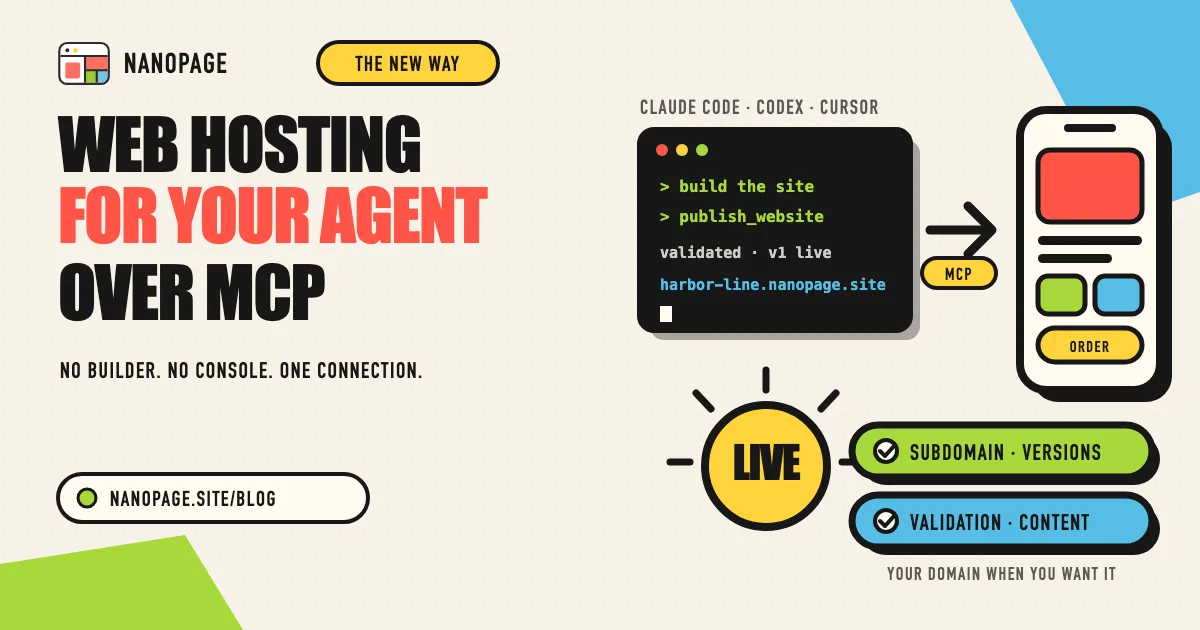
Nanopage exposes that infrastructure over MCP. Connect it once, and any agent that speaks the protocol has a hosting provider it can call directly. You never touch the Nanopage front end, except for one thing: pointing your own domain at the site. Everything else happens in the conversation you are already having.
The part your agent cannot do alone
Ask an agent to "build me a landing page and put it online" and watch where it stalls. The page is easy. The rest is a list of decisions that have nothing to do with the page:
- Where do the files live? A bucket, a static host, a container somebody has to keep running.
- What is the URL? Somebody has to register a subdomain, wire DNS, and get a certificate.
- What happens on the second publish? Overwrite in place, or keep the old one so you can go back?
- What if the agent produces something unsafe? A page that loads scripts from an unknown origin, embeds another site, or registers a service worker should not go live unquestioned.
- How do you change one line of content later? Rebuild the whole thing, or have a place where data lives separately from design?
Every one of those is solvable. Every one of them is also a project you did not sign up for when you asked for a landing page. Most people either script something fragile around a general cloud provider, or give up and paste the HTML into a site builder by hand.
Nanopage answers all five with one MCP connection.
What the agent gets
Once connected, the agent sees a small set of tools and one authoring guide. Together they cover the whole hosting lifecycle:
- A live subdomain, immediately. The agent checks a slug, publishes a bundle, and the site is serving at
https://your-slug.nanopage.sitewhen the call returns. DNS, TLS, caching, and global delivery are already done. - Versioning by default. Every publish is a new version of the same website. The previous version is kept. The agent can publish a version without promoting it, so a draft can sit next to the live site until you are ready.
- Validation with machine-readable errors. Nanopage checks each bundle before it goes live. Remote assets, embedded frames, service workers, unsafe URL patterns, and unsupported file paths are rejected with errors the agent can read, fix, and retry on its own.
- Dynamic content without a rebuild. The agent can ship a
collections.jsonmanifest and templates alongside the pages. News, blog posts, products, events, FAQs, and visitor contact forms then live as data. Adding an entry later costs nothing and needs no new publish. - Account visibility. The agent can list your websites, inspect a site and its collections, see which version is live, and read files from stored versions.
- Uploads for large assets. Images and other binaries can be sent inline, fetched from a public URL, or pushed through a signed upload so the publish call stays small.
What the agent does not get is anything destructive. Deleting a website, managing tokens, and revoking access stay in the signed-in dashboard, where you can see when a connection was last used and cut it off.
Any client, same hosting
MCP is the Model Context Protocol, a standard way for an AI client to discover and call tools another service provides. Nanopage does not care which client is on the other end. The setup page has copy-ready configuration for:
- Claude Code, from the terminal or a project
.mcp.json - Claude Desktop, as a custom connector
- Cursor, from its MCP config
- Codex CLI, through the
mcp-remotebridge - Anything else, using a personal access token for CI pipelines, scripts, and clients that cannot open a browser
For the desktop clients, sign-in happens in your browser on first use. There is no token to paste and nothing to store in a config file. For automation, a token does the same job and can be revoked at any time.
The tools, the validation rules, and the resulting URL are identical regardless of client. Switch agents next month and your sites, versions, and domains come with you.
A publish loop in practice
Here is what the whole thing looks like from inside Claude Code, once the server is added.
Read the Nanopage authoring guide. Then build a one-page site for
"Harbor Line Coffee" from the copy in ./brand and the photos in ./photos.
Publish it to Nanopage under the slug harbor-line.
The agent reads the guide, writes the bundle, checks the slug, and publishes. It reports back with the live URL.
A week later:
Add a "News" collection with a listing page and item pages. Seed it
with the two announcements in ./news. Publish as a new version.
The agent ships the manifest and templates, and the site now has a news section whose entries you can manage as data. Then:
Move the hero call to action above the fold and use the darker photo.
Publish, but don't promote it yet. I want to look first.
You get a version you can review. When it is right, promote it from the site's version list in the dashboard, or have the agent publish it again with promotion on. If a later version turns out to be worse, any earlier one can be promoted back the same way.
None of those steps involved a deployment script, a hosting console, or a tab outside the agent.
The one thing you do in the dashboard
Custom domains.
When you want harborlinecoffee.com instead of the Nanopage subdomain, you open the site in the Nanopage dashboard, add the domain, and update your DNS at your registrar. Nanopage handles the certificate. If DNS is unfamiliar, this guide walks through what each step means.
That is a deliberate boundary. Attaching a domain is an ownership action, and it is better done by a person with the registrar login than by an agent with a token.
Everything else that comes with a Nanopage site, including analytics, password protection, and collaborator access, is there for MCP-published sites too. You can use it from the dashboard when you want to. You are not required to.
Why not just use a general cloud provider?
You can. Plenty of people have a working setup on a general-purpose platform. The difference is what the agent has to know.
A general provider gives you primitives: storage, compute, DNS, certificates, a CLI. An agent can use them, but only after you have decided how they fit together, and every agent session inherits those decisions as context it must be told about. A stray misconfiguration goes live because nothing between the agent and the internet knows what a website is supposed to look like.
Nanopage gives the agent a contract instead. The authoring guide says what a valid site is. The validator enforces it. The version model says what happens on the second publish. The collection model says where changing content goes. The agent reads that contract once and works inside it, and the contract is the same on every client and in every session.
For a single web app with its own backend, you still want the general platform. For the much larger category of sites that are pages, assets, and some structured content, the contract is the better tool.
Getting started
- Open the Nanopage MCP setup page and add the server to your client.
- Ask the agent to read the Nanopage authoring guide.
- Describe the site, or point the agent at the material in your project, and ask it to publish.
The first publish takes a few minutes. Every publish after that is a sentence. Plans are listed on the pricing page, and every site comes with the same hosting features whichever way it was built.
Your agent already knows how to write a website. Now it has somewhere to put it.